<< Return to Quick Start Guide index
Once you are logged into the Zntri app you will be provided with a list of organizations that your belong to. This screen is referred to as the app home screen and you can return to it at any time by tapping the home button in the top left corner of the app.
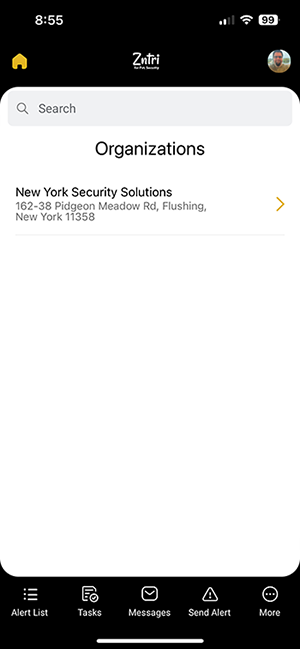
If the organization list is empty, than the account you logged into is not a member of any existing organization. Please contact your organization admin in order to have them add you as a member.
In many cases this could be caused by the organization admin adding the wrong mobile number when adding you as a member.
To connect with an organization you can tap any of the organizations in the list.
When connecting to an organization you will be taken to either the first applet for that organization or the last applet you had opened when you were last connected to that organization. Normally this would be the Alert List applet.
Once connected, you should see the connected organization name in the center of the top navigation bar.

If you belong to more than one organization, some applets such as the alert list and messages will allow you to access to content across all organizations you belong to while others will only provide information that is relevant to the connected organization such as members and teams.
NEXT GUIDE: Add Members to your Organization >>
Was this article helpful?
That’s Great!
Thank you for your feedback
Sorry! We couldn't be helpful
Thank you for your feedback
Feedback sent
We appreciate your effort and will try to fix the article