<< Return to Quick Start Guide index
In Zntri, Alerts are one of the most important features and as such understanding how alerts work will be critical to you success. There are 4 major components that make up each alert and they are all used to determine who should receive the alert and what each person is responsible for doing during that alert.
Task Types
Task types are a library of tasks that can be performed during an alert. Once a task type has been added it can be assigned to alert types and areas so that when an alert happens the tasks will be presented to the correct people to handle them.
Alert Types
Alert types are the primary subject matter of the alert. The alert type identify what the problem is and is selectable when creating a new alert or SOS. Task types are assigned to an alert type so that when an alert happens only tasks that are relevant to the alert type are made available.
Areas
Areas break down your organization into geo spatial zones. For example, these could be specific buildings or areas within a building or campus. Task types are also assigned to areas so that when an alert happens within a particular area additional relevant tasks can be made available. Task types added to an area can also have additional area specific information added where there are special details that vary from one area to another (such as building codes or object locations).
Teams
Members within your organization can be assigned to one or more teams. Each team can be assigned alert types and areas based on their specific role within your organization. When alert types and areas are assigned to a team, you will also select what tasks withing those that they will be responsible for handling. When an alert happens, only the teams that are assigned to the specific alert type & areas combination will be notified and prompted to take action.
Overview
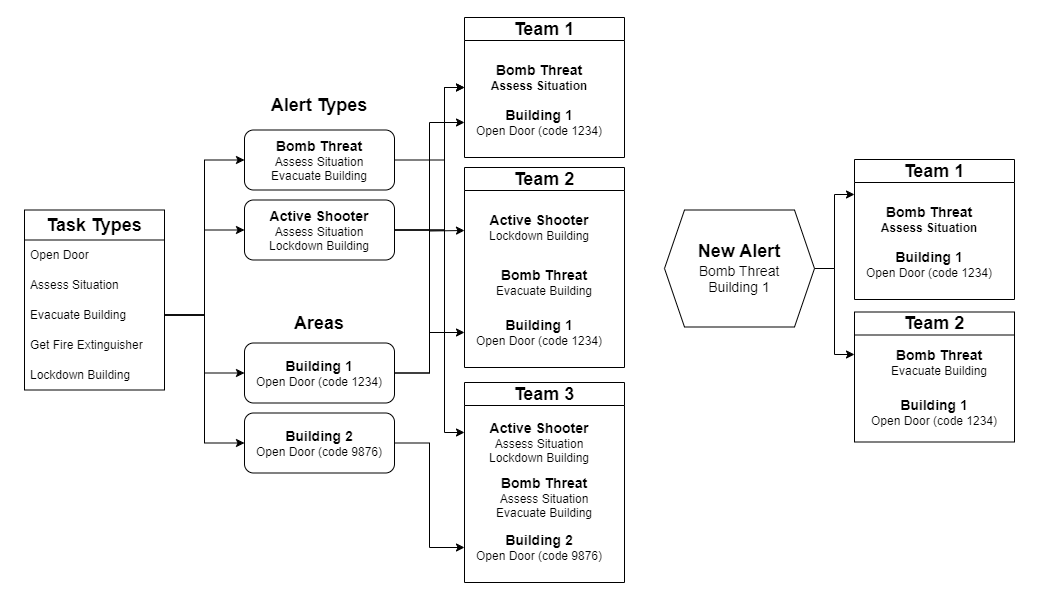
To help illustrate how alerts work, the following is a diagram of the process of creating a set of task types, assigning them to alert types and areas and then assigning those to team. You will see that the end result of when the new alert happens only the specific teams are included and only the tasks associated with the respective alert type and areas are provided.
NEXT GUIDE: Manage Task Types >>
Was this article helpful?
That’s Great!
Thank you for your feedback
Sorry! We couldn't be helpful
Thank you for your feedback
Feedback sent
We appreciate your effort and will try to fix the article